
Close Menu
Piper Flyer AssociationPiper Flyer Association
  • Home
  • Members
    • Member Dashboard
    • Parts Locating
    • Edit Profile
    • Member Benefits
    • Renew
  • Forums
  • Piper Models
    • Piper Singles
      • Piper Cubs
      • Piper PA-11, PA-12, PA-14
      • Piper Short Wing
      • Piper PA-18 Super Cub
      • Piper PA-24 Comanche
      • Piper Pawnees
      • Piper PA-28 Cherokee
      • PA-32 Series
      • Piper PA-38 Tomahawk
      • Piper M Series
    • Twin Engine
      • Piper PA-23 Apache/Aztec
      • Piper PA-30 Twin Comanche
      • Piper PA-31 Series
      • Piper PA-34 Seneca
      • Piper PA-42 Cheyenne
      • Piper PA-44 Seminole
  • Magazine
    • ONLINE MAGAZINES
      • 2026 ONLINE MAGAZINES
      • 2025 ONLINE MAGAZINES
      • 2024 ONLINE MAGAZINES
      • 2023 ONLINE MAGAZINES
      • 2022 ONLINE MAGAZINES
      • 2021 ONLINE MAGAZINES
      • 2020 ONLINE MAGAZINES
      • Prior Years
    • Article Archive
      • Maintenance & Technical
      • Other Popular Articles
    • Featured Articles
  • Knowledge Base
    • Aviation News
    • Aviation Alerts
    • Videos
    • Annual Checklist
    • Piper Flyer Sponsors
    • Keep Your Piper Ownership Affordable
  • Login
  • Join
Free Newsletter
What's Hot

Signia Aerospace Expands Aircraft Systems Capability with Aerox Acquisition

Garmin unveils D2 Mach 2 Pro, its first aviator smartwatch with inReach technology

Garmin adds Airport and FBO Comments feature to Garmin Pilot and announces sales promotion

Facebook X (Twitter) Instagram
Join PFA Renew
Piper Flyer Association
Free Newsletter Login
  • Home
  • Members
    • Member Dashboard
    • Parts Locating
    • Edit Profile
    • Member Benefits
    • Renew
  • Forums
  • Piper Models
    • Piper Singles
      • Piper Cubs
      • Piper PA-11, PA-12, PA-14
      • Piper Short Wing
      • Piper PA-18 Super Cub
      • Piper PA-24 Comanche
      • Piper Pawnees
      • Piper PA-28 Cherokee
      • PA-32 Series
      • Piper PA-38 Tomahawk
      • Piper M Series
    • Twin Engine
      • Piper PA-23 Apache/Aztec
      • Piper PA-30 Twin Comanche
      • Piper PA-31 Series
      • Piper PA-34 Seneca
      • Piper PA-42 Cheyenne
      • Piper PA-44 Seminole
  • Magazine
    • ONLINE MAGAZINES
      • 2026 ONLINE MAGAZINES
      • 2025 ONLINE MAGAZINES
      • 2024 ONLINE MAGAZINES
      • 2023 ONLINE MAGAZINES
      • 2022 ONLINE MAGAZINES
      • 2021 ONLINE MAGAZINES
      • 2020 ONLINE MAGAZINES
      • Prior Years
    • Article Archive
      • Maintenance & Technical
      • Other Popular Articles
    • Featured Articles
  • Knowledge Base
    • Aviation News
    • Aviation Alerts
    • Videos
    • Annual Checklist
    • Piper Flyer Sponsors
    • Keep Your Piper Ownership Affordable
  • Login
  • Join
Piper Flyer AssociationPiper Flyer Association
Renew
Home » Garmin unveils Garmin Pilot Web, an online flight planning tool
Aviation News

Garmin unveils Garmin Pilot Web, an online flight planning tool

Kent DellenbuschBy Kent DellenbuschApril 30, 20254 Mins Read
Facebook Twitter Pinterest LinkedIn Tumblr WhatsApp Email

Garmin Pilot ecosystem expanded to the web with new free flight planning features

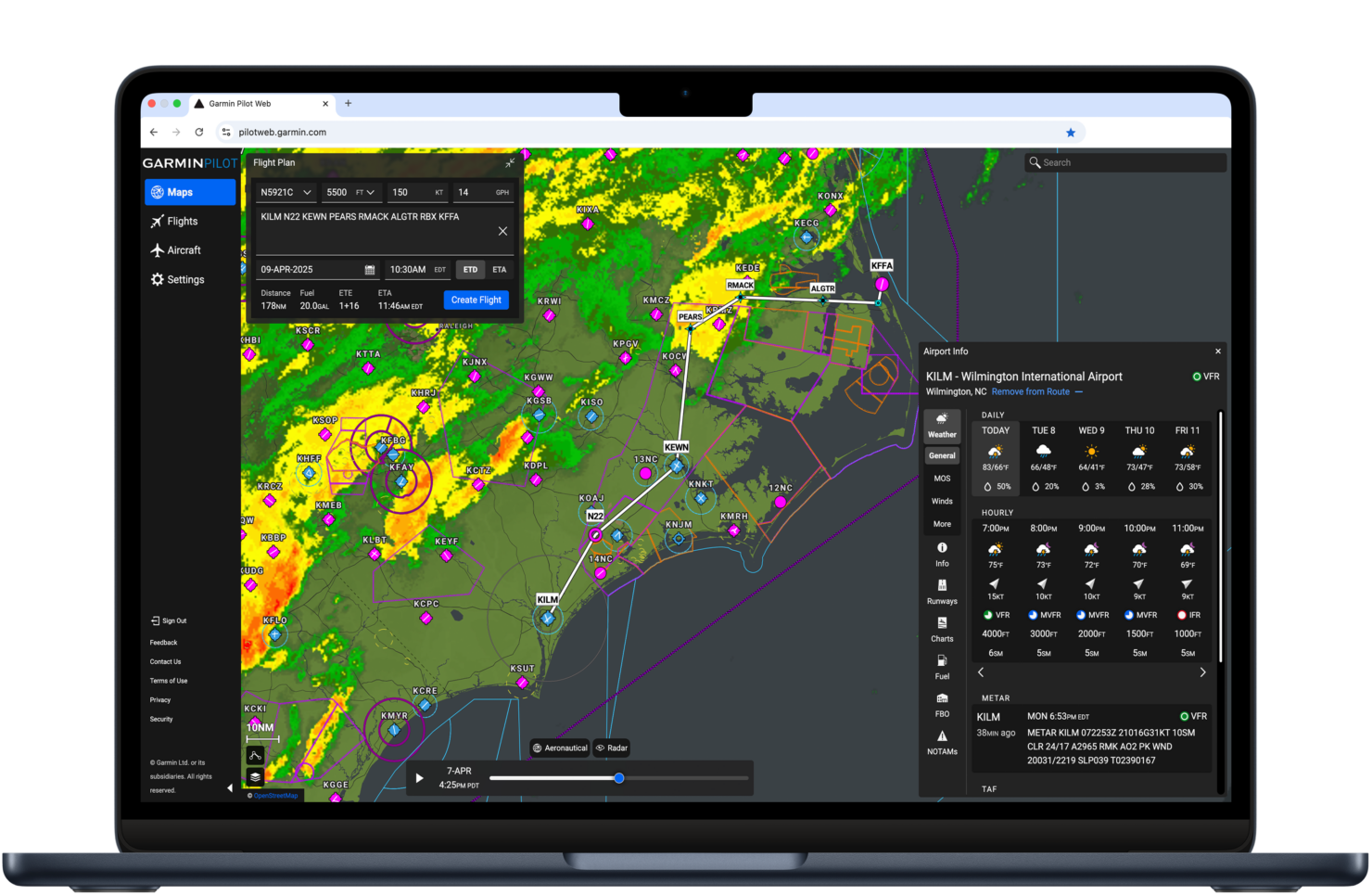
Garmin introduced Garmin Pilot Web, its new powerful flight planning website that complements the Garmin Pilot™ mobile app. Garmin Pilot Web offers an expansive set of free features for all pilots, including at-a-glance flight planning with high-resolution maps and charts, airport information, weather and aeronautical data overlays for an information rich experience. Garmin Pilot mobile users in North America will have expanded access to Garmin Pilot Web features including robust flight planning, routing, filing, aircraft performance data, a live internet traffic layer and more.  

“The Garmin Pilot mobile app has always been known for incredible maps and weather overlays, and we’re excited to bring those capabilities and more to the web. If you are not already familiar with Garmin Pilot, I encourage you to give Garmin Pilot Web a try when planning your next flight. With its free, at-a-glance tools – you will find it can greatly simplify your online flight planning workflow.

–Carl Wolf, Garmin Vice President of Aviation Sales, Marketing, Programs & Support

Free flight planning tools and maps

Available for free to all aviators, Garmin Pilot Web’s Map tab provides a variety of mapping options such as topographic maps, satellite view, VFR sectionals, IFR High/Low charts and street maps. Using the Map Controls menu, overlays for a new aeronautical layer, radar, AIR/SIGMETs, TFRs, temps, fuel prices and more can be selected for additional detail. The Winds Aloft overlay allows pilots to select a specific altitude and view a highly visual depiction of wind and pressure system information.

Basic route planning allows pilots to enter the desired route and select the altitude, speed and fuel burn for their aircraft. The distance, fuel required, ETE and ETA will then be calculated for the selected route, with the option to display fuel burn, true air speed, winds aloft and more at various altitude levels. Airport information is also available, including daily & hourly forecasts1 in addition to aviation centric weather data. Runway information, terminal charts, FBOs, Garmin SafeTaxi® diagrams and more are also accessible in the Airport Info menu.

In-depth flight planning and aircraft profiles for mobile app users

Garmin Pilot mobile app users can enjoy additional features on Garmin Pilot Web by utilizing the Flights and Aircraft tabs. The Flights tab allows pilots to create, save and file flight plans, as well as view weather briefings. Also within the Flights tab, pilots can view details for their flight plan such as distance, fuel required, estimated time enroute, payload and fuel calculators that show how much useful load remains, and more. Routes cleared previously are also displayed, making it easier for pilots to plan their own routes to similar destinations. Using the procedure selector, pilots can simultaneously view departures, approaches or arrivals on a map alongside a flight plan so it’s easier to visualize and select the most appropriate procedure based on a flight plan and intended direction of flight.

The Aircraft tab allows pilots to add new aircraft, edit current aircraft and tailor aircraft performance data conveniently from their computer. To simplify the process, pilots can choose to add their aircraft from an existing template or add it manually. Flight plans and aircraft data are synced across Garmin Pilot platforms.

Additionally, Garmin Pilot mobile users can view live internet traffic on Garmin Pilot Web – including flight details such as the callsign, aircraft type and more when available.

To access Garmin Pilot Web, visit pilotweb.garmin.com. To take advantage of all Garmin Pilot Web features, visit garmin.com/garminpilot and select the plan that best suits your flying. Full-featured flight planning is available in North America at launch, with additional regions planned in the future.

Garmin products and services have revolutionized flight and become essential to the lives of pilots and aircraft owners and operators around the world. A leading provider of solutions to general aviation, business aviation, rotorcraft, advanced air mobility, government and defense, and commercial air carrier customers, Garmin believes every day is an opportunity to innovate. Recipient of the prestigious Robert J. Collier Trophy for Garmin Autoland, Garmin developed the world’s first certified autonomous system that activates during an emergency to control and land an aircraft without human intervention. Visit the Garmin Newsroom, email our media team, connect with @garminaviation on social, or follow our blog.

1Available in the United States.

aeronautical data overlays airport information charts flight planning Garmin Pilot Web high resolution maps pilots weather
Previous ArticleU.S. Air Force to bring U-2 aircraft as part of EAA AirVenture Oshkosh 2025
Next Article AOPA Applauds FAA Withdrawal of Proposed Airman Medical Denial Policy
Kent Dellenbusch

Related Posts

Signia Aerospace Expands Aircraft Systems Capability with Aerox Acquisition

April 16, 2026

Garmin unveils D2 Mach 2 Pro, its first aviator smartwatch with inReach technology

April 14, 2026

Garmin adds Airport and FBO Comments feature to Garmin Pilot and announces sales promotion

April 14, 2026

Adventure Pilot Releases iFly EFB 14 with Satellite Imagery, Enhanced Charts, and Performance Upgrades

April 12, 2026
Don't Miss
Aviation News

Signia Aerospace Expands Aircraft Systems Capability with Aerox Acquisition

By Kent DellenbuschApril 16, 2026

Signia Aerospace, a portfolio company of Arcline Investment Management, has acquired Aerox Aerospace Group (“Aerox”),…

Free Newsletter

Piper Flyer Association is the trusted resource for Piper aircraft owners and pilots, providing expert maintenance guidance, ownership support, and safety information for Piper airplanes.

About Us

  • Mission Statement
  • Our Values
  • Who We Are
  • Contact Us
  • Mission Statement
  • Our Values
  • Who We Are
  • Contact Us

Site Info

  • Advertise
  • Privacy Policy
  • Terms of Service
  • Cancel/Refund
  • Advertise
  • Privacy Policy
  • Terms of Service
  • Cancel/Refund

Membership

  • Join
  • Events
  • Benefits
  • Join
  • Events
  • Benefits

Get In Touch

1042 N Mountain Ave Ste B #337 Upland, CA 91786
Email:
 kent@aviationgroupltd.com
Contact: 626-844-0125

Free Newsletter
Facebook X (Twitter) Instagram

All rights reserved. PIPER FLYER ASSOCIATION. © 2004-2026 All Rights Reserved

Type above and press Enter to search. Press Esc to cancel.

In order to provide you with the best online experience this website uses cookies.

By using our website, you agree to our use of cookies. Learn more

Functional Always active
The technical storage or access is strictly necessary for the legitimate purpose of enabling the use of a specific service explicitly requested by the subscriber or user, or for the sole purpose of carrying out the transmission of a communication over an electronic communications network.
Preferences
The technical storage or access is necessary for the legitimate purpose of storing preferences that are not requested by the subscriber or user.
Statistics
The technical storage or access that is used exclusively for statistical purposes. The technical storage or access that is used exclusively for anonymous statistical purposes. Without a subpoena, voluntary compliance on the part of your Internet Service Provider, or additional records from a third party, information stored or retrieved for this purpose alone cannot usually be used to identify you.
Marketing
The technical storage or access is required to create user profiles to send advertising, or to track the user on a website or across several websites for similar marketing purposes.
  • Manage options
  • Manage services
  • Manage {vendor_count} vendors
  • Read more about these purposes
View preferences
  • {title}
  • {title}
  • {title}

Sign In or Register

Welcome Back!

Login below or Register Now.

Lost password?

Register Now!

Already registered? Login.

A password will be e-mailed to you.