Close Menu
Piper Flyer AssociationPiper Flyer Association
  • Home
  • Members
    • Member Dashboard
    • Parts Locating
    • Edit Profile
    • Member Benefits
    • Renew
  • Forums
  • Piper Models
    • Piper Singles
      • Piper Cubs
      • Piper PA-11, PA-12, PA-14
      • Piper Short Wing
      • Piper PA-18 Super Cub
      • Piper PA-24 Comanche
      • Piper Pawnees
      • Piper PA-28 Cherokee
      • PA-32 Series
      • Piper PA-38 Tomahawk
      • Piper M Series
    • Twin Engine
      • Piper PA-23 Apache/Aztec
      • Piper PA-30 Twin Comanche
      • Piper PA-31 Series
      • Piper PA-34 Seneca
      • Piper PA-42 Cheyenne
      • Piper PA-44 Seminole
  • Magazine
    • ONLINE MAGAZINES
      • 2026 ONLINE MAGAZINES
      • 2025 ONLINE MAGAZINES
      • 2024 ONLINE MAGAZINES
      • 2023 ONLINE MAGAZINES
      • 2022 ONLINE MAGAZINES
      • 2021 ONLINE MAGAZINES
      • 2020 ONLINE MAGAZINES
      • Prior Years
    • Article Archive
      • Maintenance & Technical
      • Other Popular Articles
    • Featured Articles
  • Knowledge Base
    • Aviation News
    • Aviation Alerts
    • Videos
    • Annual Checklist
    • Piper Flyer Sponsors
    • Keep Your Piper Ownership Affordable
  • Login
  • Join
Free Newsletter
What's Hot

Missions of Honor’s Yellow Ribbon Honor Flight honors veterans as part of EAA AirVenture Oshkosh 2026 activities

Garmin brings revolutionary SmartCharts to Garmin Pilot Web

Southwest Airlines bringing ‘Independence One’ to EAA AirVenture Oshkosh 2026

Facebook X (Twitter) Instagram
Join PFA Renew
Piper Flyer Association
Free Newsletter Login
  • Home
  • Members
    • Member Dashboard
    • Parts Locating
    • Edit Profile
    • Member Benefits
    • Renew
  • Forums
  • Piper Models
    • Piper Singles
      • Piper Cubs
      • Piper PA-11, PA-12, PA-14
      • Piper Short Wing
      • Piper PA-18 Super Cub
      • Piper PA-24 Comanche
      • Piper Pawnees
      • Piper PA-28 Cherokee
      • PA-32 Series
      • Piper PA-38 Tomahawk
      • Piper M Series
    • Twin Engine
      • Piper PA-23 Apache/Aztec
      • Piper PA-30 Twin Comanche
      • Piper PA-31 Series
      • Piper PA-34 Seneca
      • Piper PA-42 Cheyenne
      • Piper PA-44 Seminole
  • Magazine
    • ONLINE MAGAZINES
      • 2026 ONLINE MAGAZINES
      • 2025 ONLINE MAGAZINES
      • 2024 ONLINE MAGAZINES
      • 2023 ONLINE MAGAZINES
      • 2022 ONLINE MAGAZINES
      • 2021 ONLINE MAGAZINES
      • 2020 ONLINE MAGAZINES
      • Prior Years
    • Article Archive
      • Maintenance & Technical
      • Other Popular Articles
    • Featured Articles
  • Knowledge Base
    • Aviation News
    • Aviation Alerts
    • Videos
    • Annual Checklist
    • Piper Flyer Sponsors
    • Keep Your Piper Ownership Affordable
  • Login
  • Join
Piper Flyer AssociationPiper Flyer Association
Renew
Home » Topics » Main Forum » PIPER MODELS » PA-28 » STROBE LIGHT SPLIT SWITCH

STROBE LIGHT SPLIT SWITCH

  • Index
  • Recent Topics
  • Search
  • Index
  • Recent Topics
  • Search
Login

Posted In: PA-28

  • Participant
    Jerry on April 14, 2021 at 12:48 pm #20610

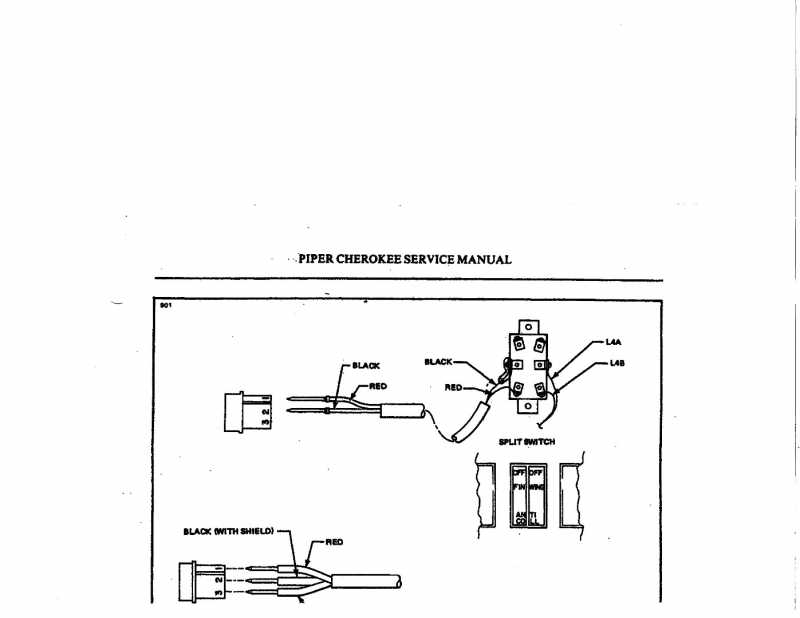
    Hello Steve and thanks for your prompt reply. After I emailed you, I went out the maintenance hanger at the airport for some “hangar flying”. As luck would have it, there was a late model Archer in for maintenance. I poked my head under the panel, took some photos and low and behold, it also had the jumper between the center lugs. It was almost as mine was originally wired except for the lower lugs, I could see the labeling on the wire as L4A. They were crossed opposite of what mine was. I went back to my plane, made a new jumper, rewired as per your instructions. Everything now works as it should. You would think that Piper would have labeled the diagrams as Whelen system with another diagram for XYZ brand of strobe system. Just wondering if there is somewhere I could have found that info. I am probably not the first person led on a wild goose chase searching for a correction. Thanks for all your help. Your instructions were “right on”! Thanks again!

    Participant
    STEVE on April 14, 2021 at 9:06 am #20609

    Hi Jerry;
    If you take a look at figure 4 F 14, you’ll see that wire L4A is power to the switch from the bus and L4B is power out of the switch to the Nav lights. The ground for each light is at the lights.
    In order to power the other side of the switch (the strobe side) there has to be power to that side of the switch; so I suggest you re install the jumper from the center lug on the right (viewed in the drawing) to the center lug on the left.
    The power to the strobes will be off the lower lug on the left side of the switch.
    The ground for the strobes will be at the flashers.

    I think what’s confusing is the illustration. It’s not for the Whelen strobes. Forget the black wire at the left side center connector. That center connector is where the power comes to the switch from the jumper from the center connector on the right side.
    Just connect the power wire to the Whelen strobes to the bottom lug on the left side.

    Let me know if this suggestion works.

    Steve

    Participant
    Jerry on April 14, 2021 at 6:58 am #20608

    I own a 73 PA-28 140 (28-7325031) that had a panel upgrade about a year ago. At that time I had the radio shop install a split 2 position rocker switch with a single lead. I am now upgrading my interior so I felt this would be an opportune time to complete the strobe system. I installed a 2 light Whelan PS and I’m keeping the original rotating beacon. I attached the 1 furnished lead that was installed previously to to the PS, turned on the master and the strobes and beacon were operating. Unfortunately, the strobes all came on when I turned on the master. Illustration 4E9 in the piper service manual clearly shows how this should be wired. When I poked my head under the panel I saw a jumper lead between the L4A lug of the switch and the center lug on the left side of the switch (illustration attached). L4A is the feed wire from the buss. The previous installed wire was also attached to the center lug on the left side the switch. I removed the jumper moved the connections around as per the drawing. I grounded the left side center lug to the airframe. The #2 wire(black) in the Molex connector shows this grounded. I moved the red wire to the bottom left lug of the switch. I really expected this all to work, but alas, it didn’t. We tested the switch and determined that the strobe side of the switch was not getting any power from the beacon side of the switch. We both agreed that the split switch was at fault and I purchased a new switch. We installed the new switch, wired as per the diagram……..Nothing but beacon only. We must be missing something with this. The diagram is so simple but something isn’t right. I do not want to install a single on/off switch for both strobes and beacon as I’ve heard others do. I would like to have them work independently as Piper had designed.Any suggestions to correcting this would greatly be appreciated. Thanks in advance for your suggestions.

    Attachments:
    • img067.jpg
Viewing 3 posts - 1 through 3 (of 3 total)
  • You must be logged in to reply to this topic.
Log In

Piper Flyer Association is the trusted resource for Piper aircraft owners and pilots, providing expert maintenance guidance, ownership support, and safety information for Piper airplanes.

About Us

  • Mission Statement
  • Our Values
  • Who We Are
  • Contact Us
  • Mission Statement
  • Our Values
  • Who We Are
  • Contact Us

Site Info

  • Advertise
  • Privacy Policy
  • Terms of Service
  • Cancel/Refund
  • Advertise
  • Privacy Policy
  • Terms of Service
  • Cancel/Refund

Membership

  • Join
  • Events
  • Benefits
  • Join
  • Events
  • Benefits

Get In Touch

1042 N Mountain Ave Ste B #337 Upland, CA 91786
Email:
 kent@aviationgroupltd.com
Contact: 626-844-0125

Free Newsletter
Facebook X (Twitter) Instagram

All rights reserved. PIPER FLYER ASSOCIATION. © 2004-2026 All Rights Reserved

Type above and press Enter to search. Press Esc to cancel.

In order to provide you with the best online experience this website uses cookies.

By using our website, you agree to our use of cookies. Learn more

Functional Always active
The technical storage or access is strictly necessary for the legitimate purpose of enabling the use of a specific service explicitly requested by the subscriber or user, or for the sole purpose of carrying out the transmission of a communication over an electronic communications network.
Preferences
The technical storage or access is necessary for the legitimate purpose of storing preferences that are not requested by the subscriber or user.
Statistics
The technical storage or access that is used exclusively for statistical purposes. The technical storage or access that is used exclusively for anonymous statistical purposes. Without a subpoena, voluntary compliance on the part of your Internet Service Provider, or additional records from a third party, information stored or retrieved for this purpose alone cannot usually be used to identify you.
Marketing
The technical storage or access is required to create user profiles to send advertising, or to track the user on a website or across several websites for similar marketing purposes.
  • Manage options
  • Manage services
  • Manage {vendor_count} vendors
  • Read more about these purposes
View preferences
  • {title}
  • {title}
  • {title}

Sign In or Register

Welcome Back!

Login below or Register Now.

Lost password?

Register Now!

Already registered? Login.

A password will be e-mailed to you.